CxFmsPPACtrl Example
Use the CxFmsPPACtrl object to display and manipulate an ActiveX CygNet FMS PPA Control in a CygNet Studio screen environment.
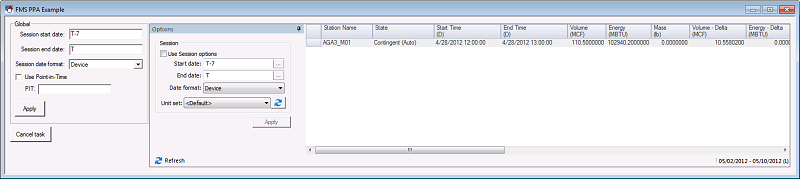
|
| CygNet FMS Prior Period Adjustment Control Example |
To see an example FMS PPA control implemented in a pre-designed screen, open the FMS PPA Ctrl.csf file found in the APPS SCREXAMP or in the CygNet\Clients\CStudio\Screens\Examples folder.
CygNet Studio Screen Script: FMS PPA Ctrl.csf
Copy
CxFmsPPACtrl Example
Sub btnApply_EventClick()
Dim This : Set This = btnApply
FmsPPA.SessionBeginDate = editStartDate.Text
FmsPPA.SessionEndDate = editEndDate.Text
FmsPPA.SessionDateFormat = cboDateFormat.Selection
FmsPPA.PITDateTime = editPIT.Text
FmsPPA.UsePIT = checkUsePIT.Check
FmsPPA.Apply True
End Sub
Sub btnCancel_EventClick()
Dim This : Set This = btnCancel
FmsPPA.Cancel
End Sub
Sub cboDateFormat_EventChange()
Dim This : Set This = cboDateFormat
FmsPPA.SessionDateFormat = this.Selection
End Sub
Sub checkUsePIT_EventChange()
Dim This : Set This = checkUsePIT
FmsPPA.UsePIT = this.Check
editPIT.Enable this.Check
End Sub
Sub TheView_EventInitialize()
Dim This : Set This = TheView
editStartDate.Text = FmsPPA.SessionBeginDate
editEndDate.Text = FmsPPA.SessionEndDate
cboDateFormat.AddString "Device"
cboDateFormat.AddString "Contract"
cboDateFormat.AddString "Local"
cboDateFormat.Selection = FmsPPA.SessionDateFormat
checkUsePIT.Check = FmsPPA.UsePIT
editPIT.Text = FmsPPA.PITDateTime
editPIT.Enable = FmsPPA.UsePIT
End Sub

